

Wiring Guardrails into Vue.js: Frontend Testing and CI on a Trunk-Based Setup
The guardrails that keep a project healthy - unit tests, a CI check, a protected trunk - don't need to wait until the project grows. This post walks through a clear first setup: a fresh Vue 3 scaffold with testing included at scaffolding time, Pinia as the home for app logic, a first meaningful unit test, and a GitHub Actions check that blocks the merge when it's red.
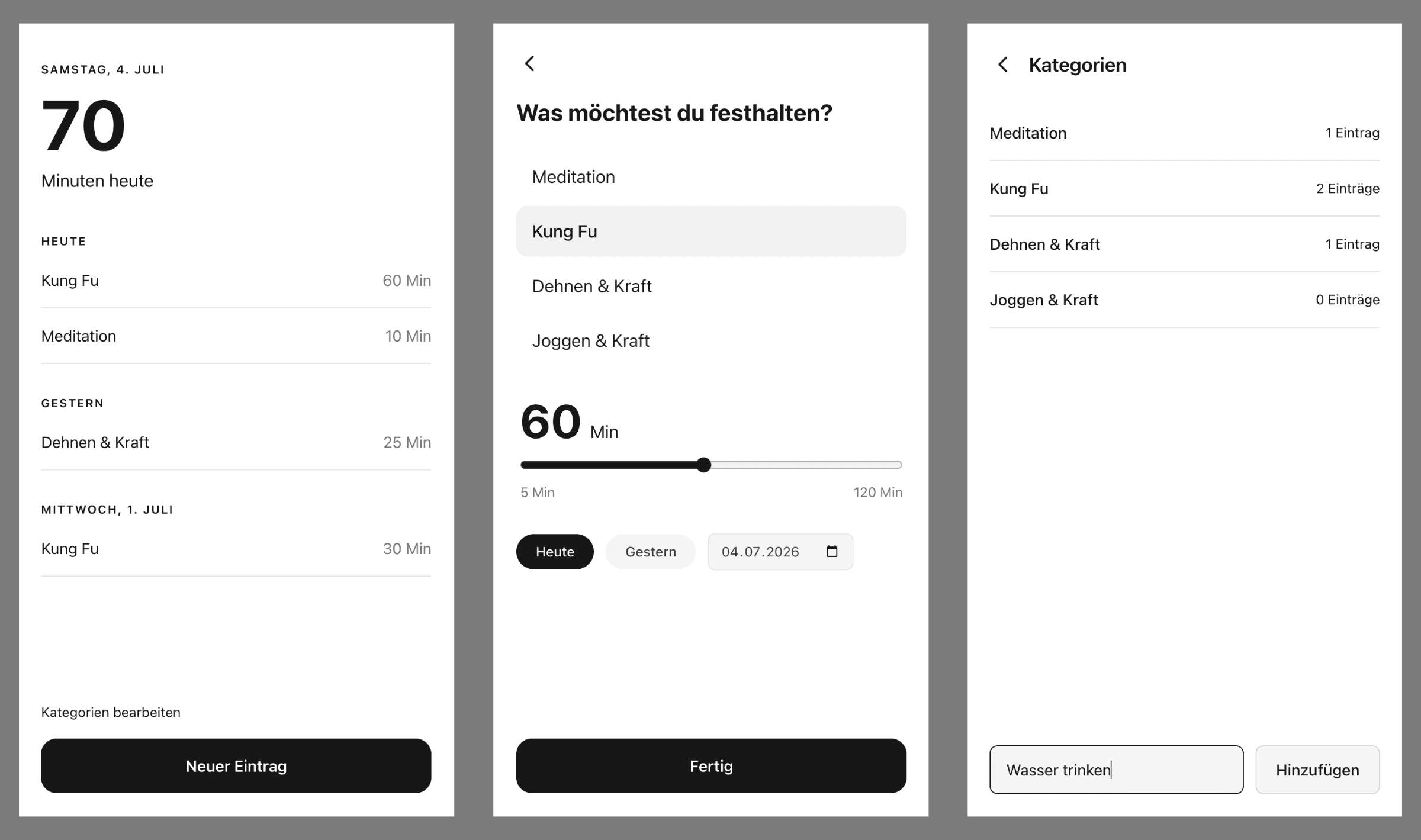
The app behind it is a very simple first UI in Vue.js - a habit tracker, no backend - built to try out frontend testing. The setup around it is the actual point.
- 1. Scaffold with testing included
- 2. First unit test: the store, not the template
- 3. CI with GitHub Actions
- 4. Make the check a gate: trunk-based development
- 5. Working the loop with the GitHub CLI
- Lessons along the way
- What this costs, what it protects
1. Scaffold with testing included
Vue's official scaffolding tool, create-vue, asks what to include. Say yes to testing right here - it's one prompt now instead of a retrofit later:
npm create vue@latest
- TypeScript
- Pinia - state management
- Vitest - unit testing
- Playwright - end-to-end testing (installed now, used later)
- ESLint + Prettier
That's it. vitest.config.ts, a jsdom test environment, and the test:unit script are all in place before you write a line of code. Official references: Vue Quick Start and the Vue Testing Guide.
Introduce Pinia from the start. For a first screen, a ref inside a component would do - but if the project grows, you want the logic to already have a home outside your components. That separation is also exactly what makes it testable without mounting anything.
2. First unit test: the store, not the template
Templates churn; logic accumulates. So the first test targets the Pinia store, where all state and rules live. Two details of this store matter for the test: it seeds a few demo entries (70 minutes dated today), and it persists to localStorage - which jsdom provides in tests, so each test resets both:
import { beforeEach, describe, expect, it } from 'vitest'
import { createPinia, setActivePinia } from 'pinia'
import { dayOffset, useHabitsStore } from './habits' // dayOffset(n): ISO date n days from today

beforeEach(() => {
  localStorage.clear() // back to the seeded demo data
  setActivePinia(createPinia()) // fresh store, no state leaking between tests
})

describe('useHabitsStore', () => {
  it('minutesToday sums only entries dated today', () => {
    const habits = useHabitsStore()
    expect(habits.minutesToday).toBe(70) // the seed: two entries dated today

    habits.addEntry({ category: 'Meditation', minutes: 5, date: dayOffset(0) })
    expect(habits.minutesToday).toBe(75)

    // An entry on another day must not count toward today.
    habits.addEntry({ category: 'Joggen & Kraft', minutes: 99, date: dayOffset(-2) })
    expect(habits.minutesToday).toBe(75)
  })
})
The two lines in beforeEach are the entire test setup. Because the logic lives in the store instead of a component, there is nothing to mount - and because jsdom provides a real localStorage, there is nothing to mock. The test exercises the actual rule, not the DOM around it.
npm run test:unit
On your machine, bare vitest behaves like a good pair programmer: it starts in watch mode, stays open, and re-runs the tests every time you save a file. On a CI runner nobody is there to save files, and a process that sits waiting would hang the pipeline forever. Vitest handles this itself: when it sees CI=true (which GitHub Actions sets automatically), it runs the suite once and exits. That's documented behavior, not a hack - the same script does the right thing at your desk and in the pipeline.
3. CI with GitHub Actions
As far as CI is concerned, a Vue app is just a Node.js project: install, build, test. So this workflow uses GitHub's official Node.js starter workflow as its baseline - the template is node.js.yml in the actions/starter-workflows repo - adapted in three places:
# .github/workflows/ci.yml
name: CI

on:
  push:
    branches: main
  pull_request:
    branches: main

jobs:
  build:
    runs-on: ubuntu-latest

    steps:
      - uses: actions/checkout@v4
      - name: Use Node.js 22
        uses: actions/setup-node@v4
        with:
          node-version: 22
          cache: 'npm'
      - run: npm ci
      - run: npm run build --if-present
      - run: npm run test:unit
The divergences from the starter: one Node version instead of a matrix (an app targets one runtime, a library targets many), the branch filters pinned to main, and the real script name (npm run test:unit - the scaffold has no test script).
push: main and pull_request is not a double run. The PR run tests a merge preview of your branch against main; the push run after merging catches semantic conflicts between PRs that were each green on their own.
4. Make the check a gate: trunk-based development
A green check that nobody has to respect is a suggestion. Two one-time settings in the GitHub UI turn it into a guarantee - this is the core of trunk-based development: everyone integrates into one protected main, in small steps, through a checked pull request.
A. Merge settings. Under Settings → General → Pull Requests:
- Uncheck Allow merge commits and Allow rebase merging; keep only Allow squash merging, with Pull request title as the default commit message.
- Check Automatically delete head branches, so merged branches clean themselves up.
B. Protect main with a branch ruleset. Under Settings → Rules → Rulesets → New branch ruleset:
- Name it (
protect-main), set Enforcement status to Active, and add the default branch as target. - Check Require a pull request before merging - required approvals: 0 is fine while you work solo.
- Check Require status checks to pass, click Add checks, and select the
buildcheck that the CI workflow created. - Check Block force pushes (usually preselected), then create the ruleset.
From now on, a red test locks the merge button, and a direct push to main is rejected server-side. Policy lives in the repo, not on each developer's machine.
Squash-only merging has a nice side effect: the PR titles are the entire history of main. Adopt Conventional Commits and you only need to enforce the convention in one place - the PR title, not every commit.
Prove it: break a test on purpose
A gate you never saw closed is a gate you hope works. So sabotage it once, deliberately. On the open PR branch, flip one assertion in the store spec and push:
# edit src/stores/habits.spec.ts:
# change  expect(habits.minutesToday).toBe(70)  →  .toBe(999)
git commit -am "Test CI gate with failing test"
git push
The required check turns red, and the merge button is disabled. This is the moment the whole setup exists for:
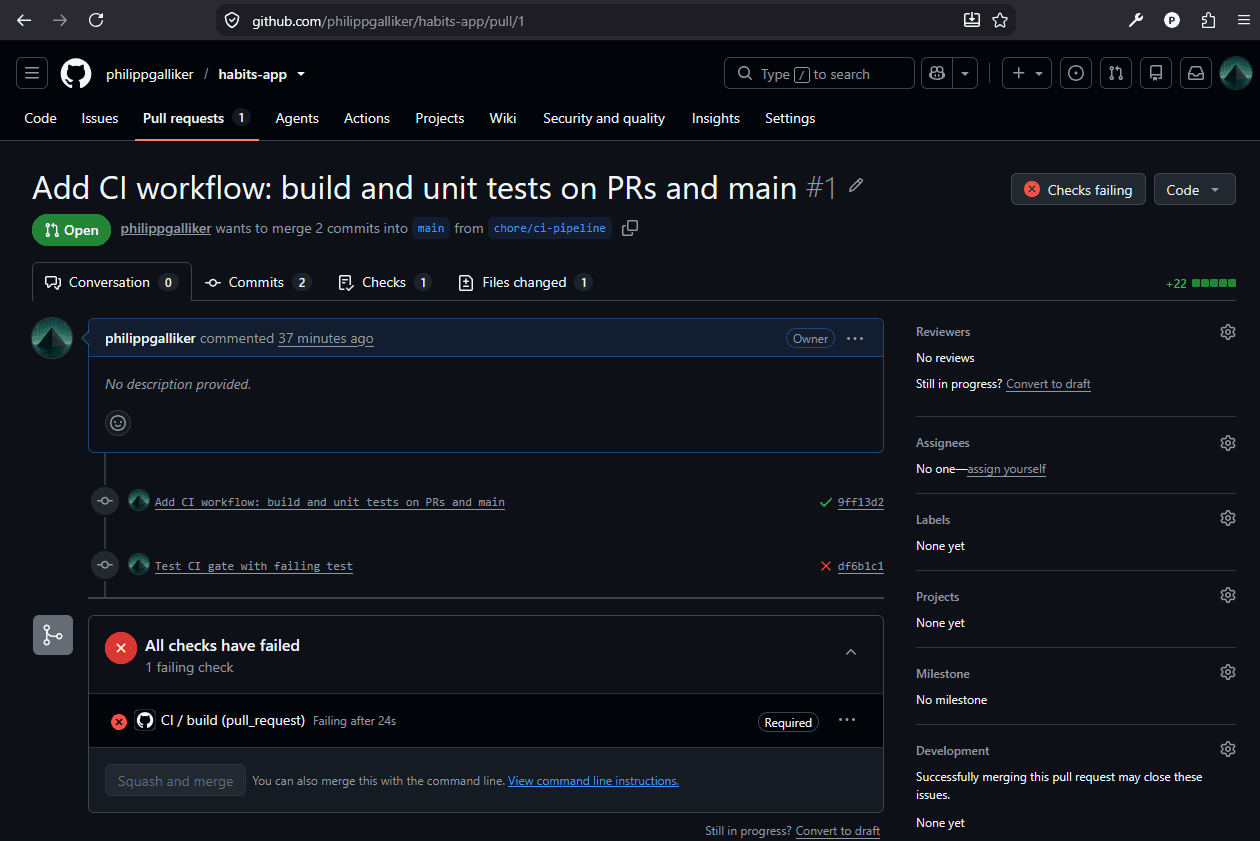
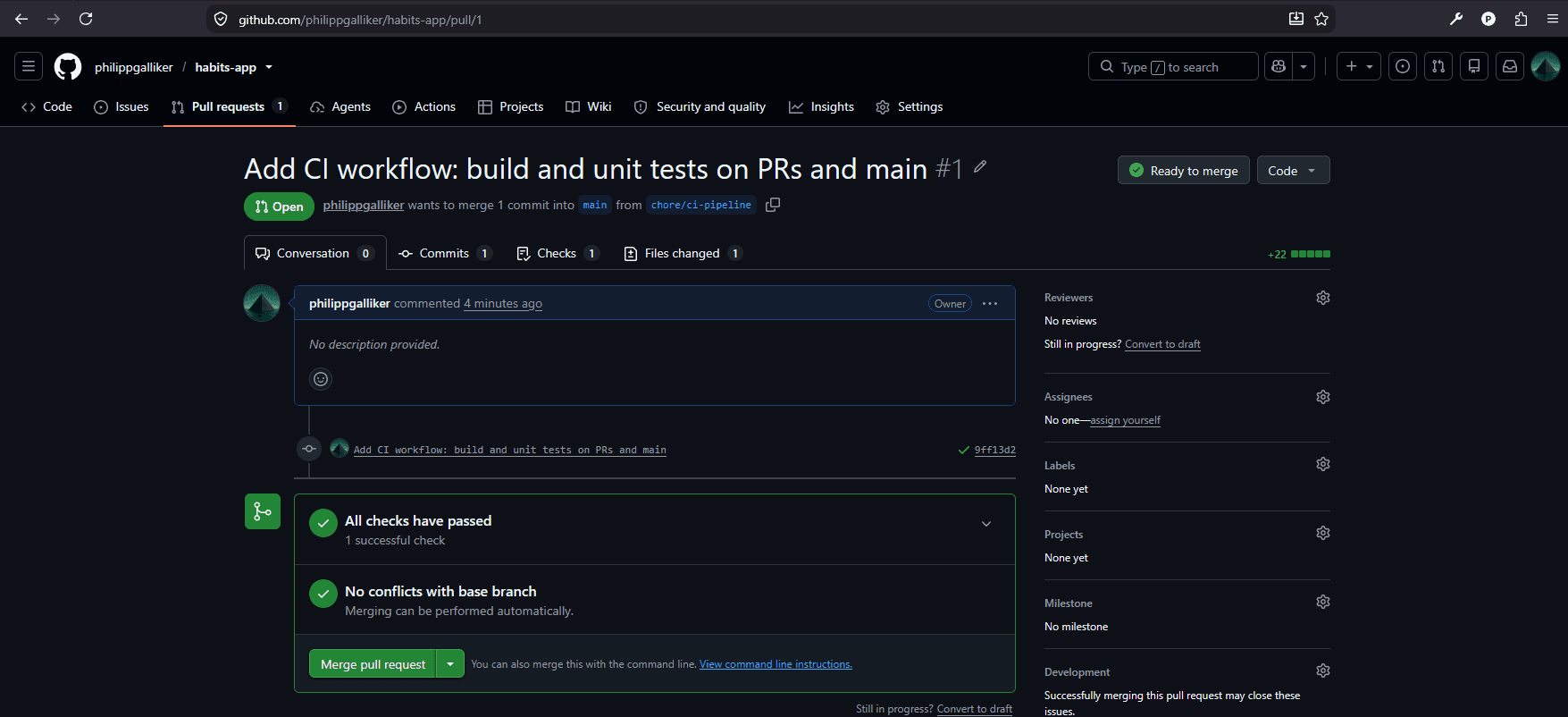
Revert the assertion and push again - the check turns green and the merge button unlocks:
# revert .toBe(999) → .toBe(70)
git commit -am "Fix test again"
git push
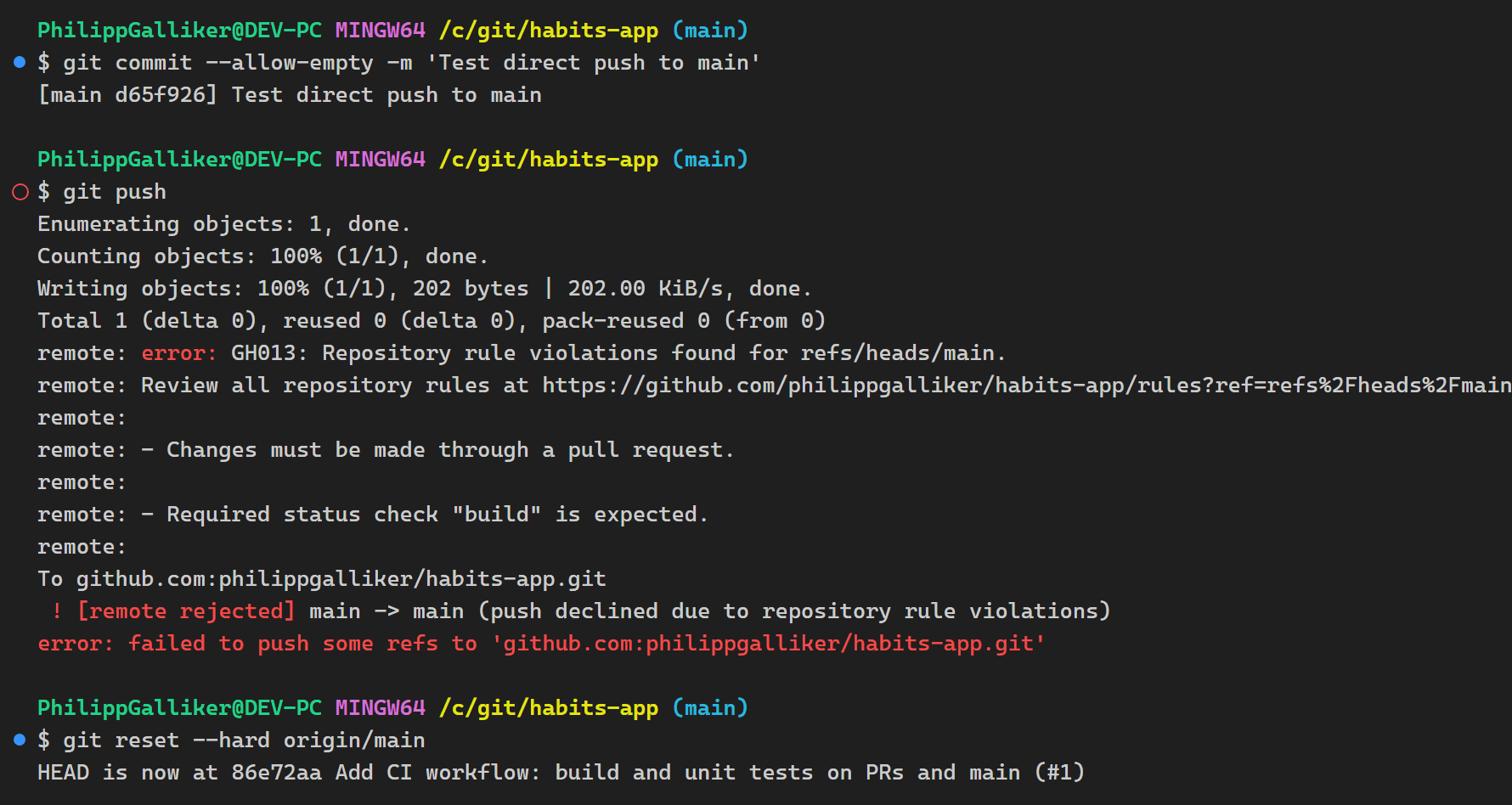
One thing left to prove: that main itself is closed. An empty commit makes a disposable test vehicle:
git switch main
git commit --allow-empty -m "test direct push"
git push                       # rejected by the ruleset
git reset --hard origin/main   # discard the test commit
The push is rejected server-side with GH013: Repository rule violations - changes must come through a pull request, and the required build check is expected. Not a warning, a hard stop:
5. Working the loop with the GitHub CLI
Once the gate is in place, the day-to-day loop doesn't need the browser at all. With the official GitHub CLI, the whole round trip is three commands:
gh pr create --fill    # open the PR, title and body taken from your commits
gh pr checks --watch   # follow the required checks live
gh pr merge --squash --delete-branch
gh pr checks --watch needs no ID at all - it finds the PR belonging to your current branch. And if you don't want to wait for the checks, gh pr merge --auto --squash --delete-branch arms auto-merge: the PR merges itself the moment everything turns green.
When a check fails, read the logs in escalating detail instead of scrolling through everything:
gh run list --limit 5              # where is the failing run?
gh run view <run-id> --log-failed  # why did it fail? (failed steps only)
gh run view <run-id> --log         # full context, if you really need it
One thing that confused me at first: without a run ID, gh run view, gh run view --log, and gh run view --log-failed look identical - each opens the same interactive run picker, and the difference only shows after you select a run. Pass the ID explicitly and the three commands do visibly different things.
One small scar from this loop: gh pr merge --delete-branch switches you back to main afterwards, and that checkout aborts if you have uncommitted changes lying around. Merge time is commit time - a dirty working tree at merge means the PR shipped without your latest edits.
Lessons along the way
The numbered steps above look smooth in hindsight. These are the detours that didn't make it into them:
- The required-check picker is a chicken-and-egg. When you create the ruleset, the Add checks search only offers checks that have already run at least once on the repository. So the order matters: merge the CI workflow first, let it run once, and only then create the ruleset and select
build. - Testing CI locally is mostly a myth. The workflow itself only truly runs on GitHub's runners. What you can test locally are the commands inside it:
CI=true npm run test:unitgives you exactly the single-run behavior the pipeline sees. Lint the YAML in your editor, then iterate on a draft PR instead of fighting with runner emulators. - Don't panic if the very first CI run flakes. My first pipeline run failed with "failed to find the runner" and passed on the retry - a race in Vitest's dependency pre-bundling, not a broken setup. Re-run a red first run once before you start debugging your workflow.
- After a squash merge,
git branch -drefuses to delete your branch. It complains "not fully merged", and technically it's right:mainreceived a new squash commit instead of your commits, so Git can't prove the branch is merged. Once the PR shows Merged on GitHub,git branch -Dis the correct and safe answer - or letgh pr merge --squash --delete-branchabsorb the cleanup entirely. - Prune your remote-tracking refs. Branches that GitHub auto-deleted still show up as
origin/<branch>locally, because remote-tracking refs are a cache, not a live view.git fetch --prunecleans up once;git config --global fetch.prune truemakes it permanent. - On the free plan, rulesets are only enforced on public repositories. Worth knowing before you wonder why direct pushes to a private repo still go through.
What this costs, what it protects
Learning all of it took about a day; setting it up when you know the pieces takes minutes. And this is the payoff: an enterprise-ready, clear first setup - trunk-based development on a protected main, with a clean first CI check running the unit tests via GitHub Actions on every pull request. Even solo, the gate catches real mistakes before they land. With a team, it's the difference between a convention and a guarantee.
The complete setup - store, tests, workflow, docs - is on GitHub, have a look at it there: github.com/philippgalliker/habits-app.
Next up: Playwright e2e tests in the same pipeline, and deploying on merge.